On March 11, 2026, the medical technology enterprise Stryker Corporation experienced an enterprise-scale cyberattack that bypassed conventional security perimeters, causing severe global disruption to its Microsoft-managed corporate environment. Rather than executing a traditional financial extortion play, the threat actors weaponized the company’s internal administrative infrastructure to carry out a massive, non-encrypting wiper attack. Handala, an Iranian-linked hacktivist group, claimed responsibility and made aggressive claims about wiping more than 200,000 devices and stealing tens of terabytes of data, while public reporting cited a source saying nearly 80,000 devices were wiped through Intune.
Historically, threat groups like ShinyHunters have noted that ransomware is no longer mandatory for monetization, stating that high-value cloud data can be stolen and used as extortion leverage directly. In this specific scenario, however, monetization was discarded. The geopolitical context of the Iranian hacktivists dictated a campaign designed solely for systemic disruption and sabotage.
| Impact Category | Operational Consequences |
|---|---|
| Endpoint Bricking | Approximately 200,000 servers, workstations, laptops, and mobile devices across 79 offices globally were factory reset overnight, leaving endpoints blank and inoperable. |
| Data Sabotage | At least 50 terabytes of corporate data were deleted from internal storage. |
| BYOD Destruction | The mass wipe command forced personal devices enrolled in Stryker's Bring-Your-Own-Device (BYOD) network to reset, permanently erasing all the personal data. |
Microsoft Intune as a Living-off-the-Land Wiper
The defining feature of the Stryker incident is its execution as a Living-off-the-Land (LotL) attack. Rather than writing custom malware, exploiting zero-day vulnerabilities, or deploying file-encrypting payloads, the threat actors leveraged Stryker’s own cloud-based Mobile Device Management (MDM) utility: Microsoft Intune.
When an endpoint (such as a Windows workstation or a mobile phone) is enrolled in Intune, it establishes an absolute trust relationship with the management plane. Any command received from the Intune orchestrator is executed by the local client without further user verification. By obtaining administrative credentials, the attackers gained access to this central management console. They subsequently abused Intune’s native “Remote Wipe” or “Factory Reset” commands.
Because these commands are standard operations within the Microsoft Graph API (specifically hitting the /deviceManagement/managedDevices/{id}/wipe endpoint), they were viewed by traditional security tools as authorized administrative tasks. Consequently, Endpoint Detection and Response (EDR) platforms failed to flag the activity, and no traditional malware signatures were triggered. The corporate environment was dismantled using its own system architecture.
| Detection Surface | Traditional Wiper Malware | SaaS-Based LotL Wiper (e.g., Intune) |
|---|---|---|
| Endpoint Execution | Drops binary files, or overwrites local system drivers. | No local binaries dropped; native MDM agent processes standard cloud administrative instructions. |
| Network Indicators | Outbound C2 traffic using custom, anomalous protocols or untrusted domain names. | Legitimate API traffic to trusted endpoints such as graph.microsoft.com or login.microsoftonline.com. |
| Security Log Signatures | Process creation alerts, unauthorized execution of privilege escalation scripts. | Normal operational logs in Microsoft Entra ID and Intune audit spaces (e.g., "Wipe device"). |
Deep dive into the technical aspect of the breach
As interesting as it is that nowadays attackers are using malware less often, and as interesting as it is how attackers are using legitimate tools (LotL) for reconnaissance, exfiltration, establishing foothold, persistence, and lateral movement, Microsoft Intune was one of the very last steps. Let’s have a look at what unlocked that last step, so attackers gained access and landed on Intune as privileged accounts and had access to that “Remote Wipe” or “Factory Reset” legitimate command.
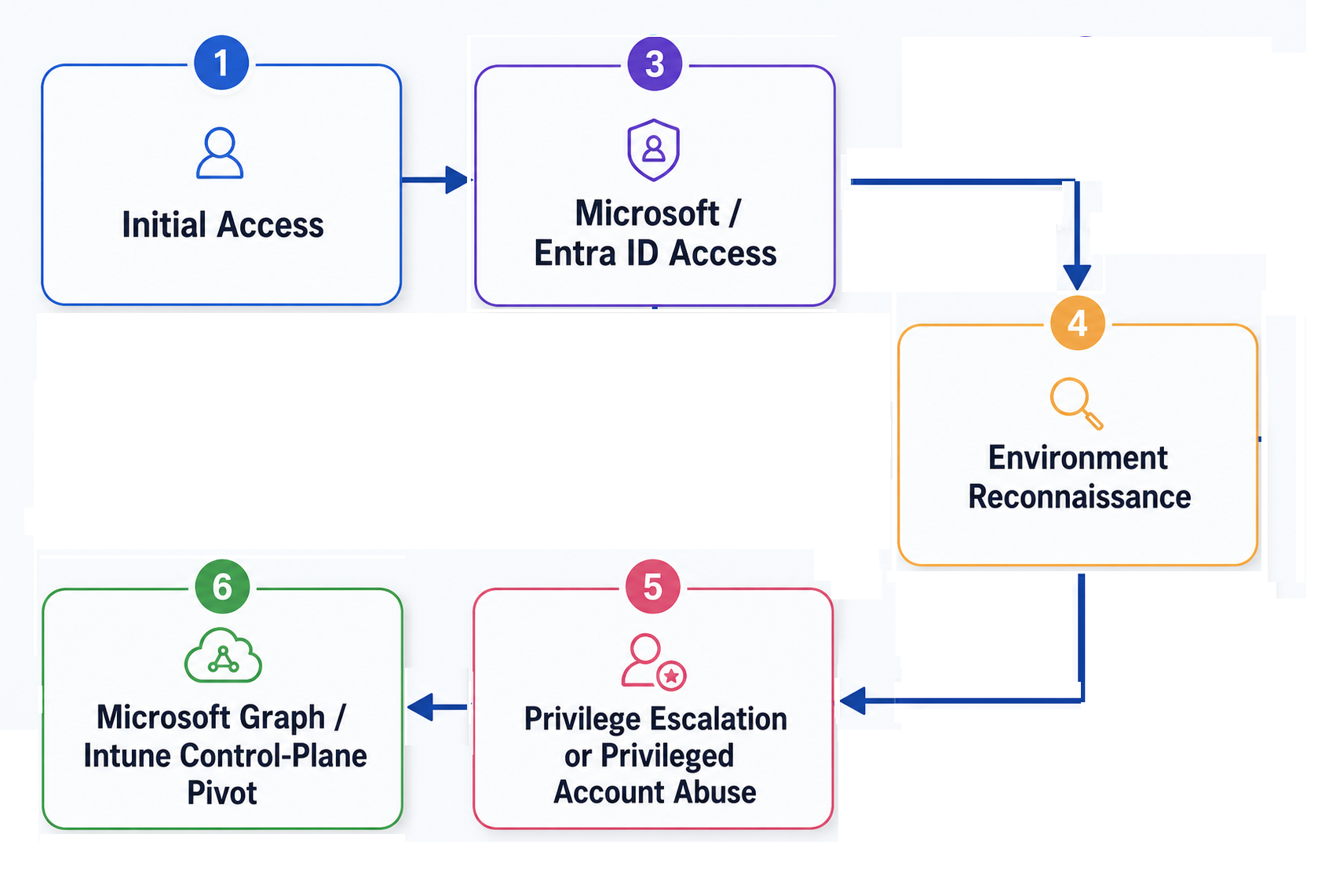
1. Initial Access
The most likely initial access path points to two main hypotheses. These are not mutually exclusive and may have worked together.
Why Infostealer Logs Matter
Before analyzing the AiTM and VPN hypotheses, it is important to understand why infostealer logs are so valuable. In the demonstration video, we show in a controlled lab environment how browser-extracted identity material can expose more than just usernames and passwords. Infostealers can recover saved credentials, browser cookies, login URLs, and session artifacts from a compromised machine. In a Microsoft 365 environment, the password alone may still be blocked by MFA or Conditional Access. The more dangerous artifact is the browser session cookie or token material, because it may represent an already-authenticated session. If still valid, that session material can allow an attacker to access the account without completing a fresh MFA challenge.
H1: Adversary-in-the-Middle Phishing
Assuming the attackers already had infostealer logs, and those logs often contain usernames, passwords, browser cookies, session artifacts, device metadata, and login URLs. However, not every credential in a stealer log is immediately usable. Some passwords may have been changed, some sessions or OAuth tokens may have expired, some accounts may require MFA again, and many accounts may belong to normal employees with no Intune or Entra privileges. Anyway, AiTM phishing is still needed because it captures a fresh post-MFA session, and this is the reason AiTM is the leading hypothesis.
Unlike traditional phishing, AiTM does not only steal a password. It captures the full authenticated session after MFA has already succeeded.
In this scenario, the attacker sends a targeted email to a Stryker employee, likely someone with IT or administrative access, disguised as a Microsoft 365 alert, SharePoint document share, or internal security notification. When the victim clicks the link, they are routed through an attacker-controlled reverse proxy positioned between the victim and the real Microsoft login page. From the victim’s perspective, the login appears normal: they enter their password, complete MFA, and land on the legitimate Microsoft 365 portal. Behind the scenes, however, the proxy captures the post-MFA session token issued by Microsoft after successful authentication.
That token is the real prize. It proves that the user has already passed MFA. Once the attacker has it, they can reuse the session without triggering another MFA prompt. If the compromised account belongs to a privileged user, such as a Global Administrator, Intune Administrator, or another high-value Microsoft role, the attacker can move directly into the Microsoft control plane.
H2: VPN brute force and lateral movement
A second hypothesis is VPN compromise followed by internal reconnaissance and lateral movement. Check Point Research reported that Handala-linked infrastructure conducted repeated login and brute-force attempts against VPN systems in the months before the attack, using commercial VPN nodes and later Starlink IP ranges to blend into legitimate traffic.
In this scenario, the attacker compromises a valid VPN account, likely belonging to an employee, contractor, or third-party user, and enters the corporate network as a seemingly legitimate user. From there, they work toward the cloud admin console.
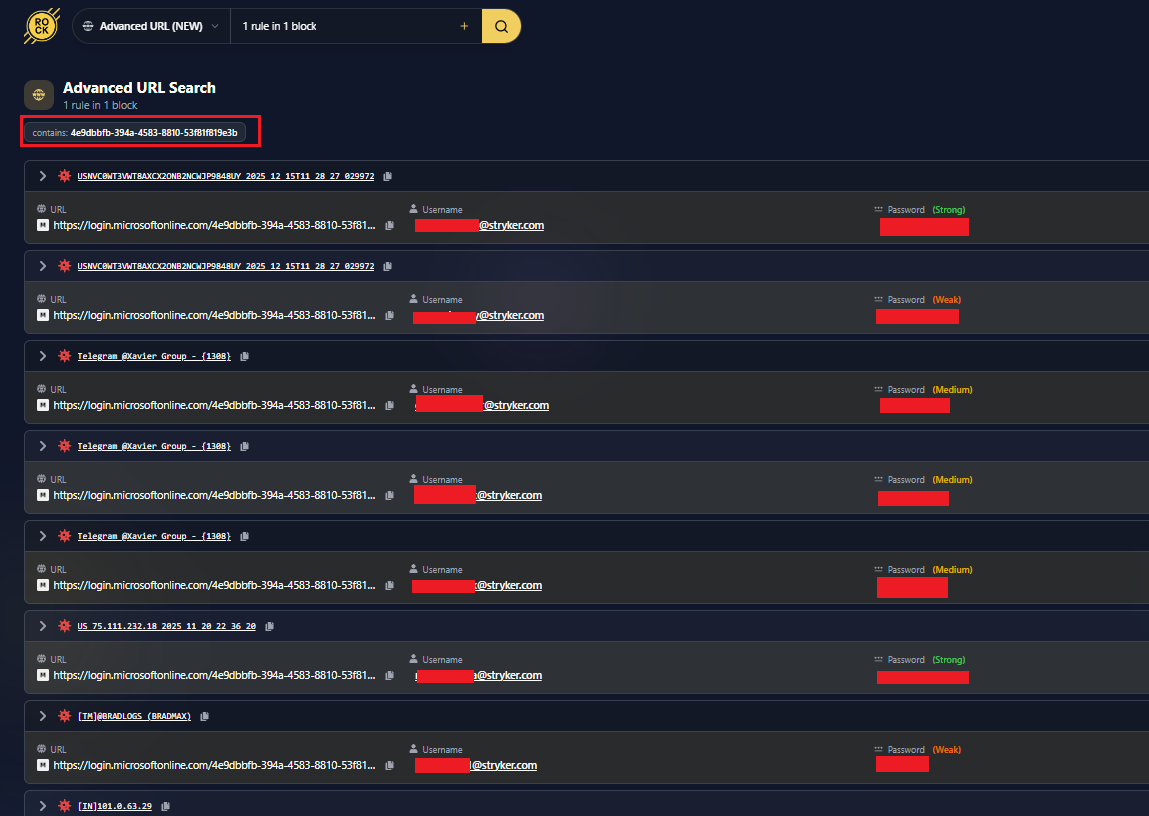
This hypothesis is also supported by reporting and threat-intelligence screenshots suggesting that Stryker-related credentials appeared in infostealer datasets, including accounts associated with Microsoft Online login infrastructure and possible MDM-related access. While this does not prove that VPN brute force was the initial access vector, it shows that valid corporate credentials may have been available before the destructive phase. If some of those accounts used weak or predictable password patterns, the same credential material could have supported password spraying, credential stuffing, VPN login attempts, or direct Microsoft 365 authentication attempts.
2. Microsoft / Entra ID Access and Internal Reconnaissance
After obtaining valid Microsoft identity material, the attackers’ next objective would be to understand what level of access they had and how Stryker’s Microsoft environment was structured. At this stage, the compromised account would be used to access Microsoft 365 or Entra ID as a legitimate user, making the activity harder to distinguish from normal login behavior.
The attackers would likely enumerate users, groups, administrative roles, privileged accounts, Conditional Access policies, service principals, application permissions, and device-management configurations. The goal is not immediate destruction, but orientation: identifying whether the compromised account already has enough privilege, or whether another path is needed to reach higher-value roles such as Global Administrator, Intune Administrator, Privileged Role Administrator, or Cloud Device Administrator.
3. Privilege Escalation or Privileged Account Abuse
After gaining access to the Microsoft environment, the attackers still needed a path to administrative control. A normal user account would not be enough to trigger Intune remote wipe or factory reset actions at scale. This means the attackers either compromised an account that already had privileged access, or they used the initial access to discover and abuse another identity with higher permissions.
Usually, when it comes to privilege escalation, there are two possibilities:
-
The attacker already had privileged credentials. Some public reporting and commentary suggested compromised admin-style accounts may have existed in infostealer logs. If those accounts had high privilege, the attacker may not have needed complex privilege escalation.
Compromised admin account → direct access to Intune / Entra admin functions -
The attacker escalated after initial access. In Microsoft environments, this usually involves enumerating Entra ID users, groups, directory roles, service principals, enterprise applications, device-management permissions, and Conditional Access gaps. The attacker is looking for accounts or objects that already have excessive permissions, can assign roles, can consent to applications, or can modify device-management settings.
Low-privileged Microsoft account
  → reconnaissance
  → discovery of overprivileged account / group / app / service principal / creates an admin role
  → privilege escalation
Attackers would also look for overprivileged Microsoft Graph permissions, such as DeviceManagementManagedDevices.ReadWrite.All, DeviceManagementConfiguration.ReadWrite.All, Directory.ReadWrite.All, RoleManagement.ReadWrite.Directory, and AppRoleAssignment.ReadWrite.All, because these permissions can expose paths into Intune administration, role assignment, or application privilege escalation.
4. Microsoft Graph / Intune Pivot
Once the attacker had the right permissions, they could move from identity access to device-control access. This is what unlocked the use of Microsoft Intune as a Living-off-the-Land Wiper described in the chapter above.
Defensive Recommendations and how SlashID Detects and Prevents
The Stryker incident shows that MFA and endpoint protection are not enough when attackers compromise identity sessions and abuse trusted administrative tools. The defense must focus on detecting session theft, limiting privileged access, and identifying abnormal admin behavior before destructive actions occur.
1. Why MFA Did Not Help
Standard MFA, including SMS codes, authenticator app OTPs, and push notifications, does not fully protect against AiTM phishing. In an AiTM attack, the victim logs into the real Microsoft page and completes a real MFA challenge. The attacker does not steal the MFA factor itself; they capture the session token issued after MFA succeeds. Once that token is stolen, the attacker can reuse the authenticated session without immediately triggering MFA again.
2. Phishing-Resistant Authentication
The strongest defenses against AiTM are phishing-resistant credentials such as FIDO2 security keys, passkeys, and Mutual TOTPs because authentication is bound to the legitimate domain. Since deploying FIDO2 across a global workforce of more than 56,000 employees in 61 countries can be operationally difficult, mutual TOTP remains the most efficient solution.
3. SlashID MITM/AiTM detection
SlashID’s MITM detection can identify when a legitimate login flow is being proxied through an attacker-controlled domain. It works by embedding a MITM detection token into protected login flows; if that token is loaded from an unauthorized proxy domain, SlashID can flag the phishing infrastructure before the attacker reuses the stolen session. This gives defenders time to revoke sessions, reset credentials, block the domain, and stop the attack before it reaches Microsoft Graph or Intune. SlashID’s MITM detection is described here.
4. Behavioral Anomaly Detection
A bulk wipe command against thousands of devices should never be normal behavior. Even if the attacker uses valid credentials, the action itself is abnormal. Useful detections include:
| Detection | Purpose |
|---|---|
| More than five wipe actions in minutes | Detect destructive activity early |
| First-time Intune wipe by an admin | Catch abnormal admin behavior |
| Wipe after suspicious login | Link session risk to admin action |
| Wipe from new device, ASN, or country | Detect hijacked sessions |
| Intune role activation followed by wipe | Detect privilege abuse |
| Graph API device actions at scale | Detect control-plane abuse |
5. Just-in-Time Privileged Access
Standing privilege turns identity compromise into enterprise compromise. High-risk roles such as Global Administrator, Intune Administrator, and Privileged Role Administrator should not remain active by default. They should require just-in-time activation, strong verification, short access windows, and full audit logging.
SlashID x Stryker Incident: Identity Controls That Could Have Disrupted the Attack Chain
Kill Chain: Where SlashID Helps
| Stryker-style attack chain | SlashID detections |
|---|---|
| Initial Access — Credential theft, phishing, infostealer, trusted relationship, or other route into a privileged cloud sign-in path. |
|
| Persistence + Privilege — Admin role changes, stale privileged credentials, new admin identities, service principals, app registrations, or Graph/Intune grants. |
|
| Data Access + Exfiltration — Valid admin or NHI access enumerates and pulls SharePoint, OneDrive, SaaS, database, or file-store data through trusted APIs. |
|
| Destructive Action — Legitimate MDM, Intune, Graph, or tenant-admin functions are used for mass wipe, delete, policy change, reset, or script deployment. |
|
Detection Matrix: SlashID vs. the Stryker-style Kill Chain
The full eight-control map, including MITRE ATT&CK mappings, telemetry logic, Stryker context, and response actions.
| SlashID detection / control | MITRE ATT&CK TTP(s) | What it detects | Stryker context | Response |
|---|---|---|---|---|
| Login from anomalous location | T1078.004 - Valid Accounts: Cloud Accounts | Admin sign-in from new ASN, geo, device, impossible travel, risky network, residential proxy, or first-time admin portal path. | A stolen or replayed credential should not look normal just because authentication succeeds. | Step-up or block / suspend |
| Admin account used outside normal patterns | T1078.004 - Valid Accounts: Cloud Accounts; T1098 - Account Manipulation | First-time Intune, Graph, or Entra console use; rare API path; unusual hour; abnormal volume of admin operations; new user-agent. | Detects living-off-the-land administration before it becomes a mass action. | Suspend user, revoke tokens, open incident workflow. |
| Stale privileged credential | T1078 - Valid Accounts | Dormant admin becomes active; long-lived credential or token used; credential age outside policy; privileged account lacks recent review. | Persistence often depends on credentials that should have been rotated, deleted, reviewed, or moved to JIT. | Rotate / delete credential, launch access review. |
| New or elevated admin identity | T1136.003 - Create Account: Cloud Account; T1098 - Account Manipulation | New Global Admin / Intune Admin; role assignment outside change window; privilege added to existing account; break-glass account touched. | Catches backdoor admin creation or role expansion that can survive reset of the originally compromised identity. | Disable rogue admin, remove role. |
| Dangerous Graph / Intune permissions granted to NHI | T1098.003 - Additional Cloud Roles; T1528 - Steal Application Access Token | Service principal or app registration receives high-risk scopes such as DeviceManagementManagedDevices.ReadWrite.All, Directory.ReadWrite.All, Sites.Read.All, or Mail.Read. | A compromised admin can convert interactive access into scriptable, persistent API access. | Revoke OAuth grant, rotate app secret / cert, disable service principal, require owner attestation and least-privilege scopes. |
| SharePoint / OneDrive data exfiltration | T1213.002 - Data from Information Repositories: SharePoint; T1530 - Data from Cloud Storage; T1567 - Exfiltration Over Web Service | Bulk Graph downloads; sensitive file access spike; unusual export velocity; cross-tenant transfer; new destination or data class outside baseline. | Even when exact exfiltration numbers are unverified, the access path is defensible and detectable. | Block identity. |
| Incomplete Tier-0 Conditional Access | Posture finding; enables T1078.004 | Admin roles excluded from Conditional Access; no phishing-resistant MFA; unmanaged device allowed; weak location policy; legacy auth; unmonitored emergency account. | Prevents a stolen credential from becoming a usable cloud-control-plane credential. | Create remediation workflow. |
| Destructive action without multi-party approval | T1651 - Cloud Administration Command; T1485 - Data Destruction; T1561.002 - Disk Wipe | Mass Intune remote wipe, factory reset, retire, bulk delete, tenant-wide policy change, script deployment, or destructive action by one admin. | The highest-impact control: a single compromised identity should not be able to trigger enterprise-scale destructive action. | Create remediation workflow. |
The Calls Were Legitimate. The Outcome Was Catastrophic.
The Stryker incident isn’t a story about novel malware. It’s what happens when a valid, over-privileged identity reaches a destructive cloud-control-plane function with nothing standing in the way. The initial sign-in, the privilege, the Graph and Intune grants, the mass wipe — every step used legitimate tooling and would have looked like ordinary administration to a perimeter- or endpoint-centric stack. That’s exactly why it worked, and exactly why it’s repeatable against any organization running its estate through Entra, Intune, and Graph.
The defense isn’t another perimeter. It’s treating identity as the control plane it has become: catching valid credentials when they behave abnormally, removing standing privilege, and requiring multi-party approval before any single identity can trigger an enterprise-scale action. The controls above map directly to that — they turn the attack chain from an invisible sequence of legitimate calls into a series of points where the action is detected, challenged, or stopped.
Defending against an attack like this starts with your identity strategy.
If you’re a security leader shaping your identity security roadmap — or you’ve looked at the Stryker attack and wondered whether your own tenant could be walked the same way — book a working session with the SlashID team. We’ll map these controls against your actual Entra, Intune, and Graph environment and show you where the blast-radius gaps are.